Meet SharePoint Knowledge Base: connected knowledge for people and agents

I recently wrote about a SharePoint resource center with dynamic filtering. I like that approach. It helps colleagues find documents and links, even if they do not know the right search term.
On October 14, 2026, Microsoft announced SharePoint Knowledge Base in Frontier Preview. Its pages use Markdown. I like that choice because M365Wizard also uses Markdown files. In SharePoint, you can use a visual editor, or edit the Markdown.
A resource center points readers to sources. In a knowledge base, you write the explanation on the page itself. You can link pages about related topics. Colleagues, Copilot, and agents can then use the same guidance. This makes SharePoint a shared knowledge platform.
Connected pages, with Markdown underneath
On a SharePoint site, choose + New → Knowledge base to create a knowledge base. Microsoft's manual creation guide explains the steps and how to edit pages.
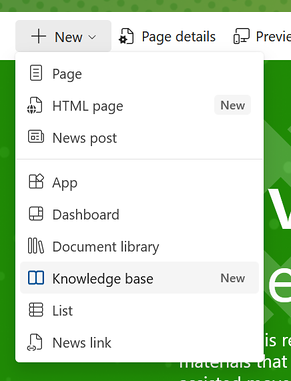
Image source: Microsoft Support: create and edit a Knowledge Base manually.
Daniel Anderson shows how it works in his first-look video. He creates an HR knowledge base and adds subpages. He also imports Markdown folders and adds page properties. The video is his. I give my own explanation and advice here.
This video is provided by YouTube.
You can load the video here or open it directly on YouTube. In either case, your browser connects to YouTube and YouTube may process data such as your IP address and information about your device and browser.
The menu shows pages and subpages. Links let readers move between related topics. You can also add properties to a page. These are stored in a block at the top of the Markdown file, called YAML frontmatter.
You can import Markdown files, Confluence content, or a classic SharePoint wiki. An import makes a one-time copy. Later changes to the old source do not carry over. Agree where you will keep the content up to date from then on.
SharePoint as a knowledge platform
Microsoft describes the Knowledge Base as a library of linked Markdown files. Its announcement explains how Copilot uses Work IQ to bring information from sources together. People and agents can use the knowledge that results.
A team can explain how a process works on these pages. It can record decisions and link to the sources. Colleagues can read that explanation. An agent can use it too.
For me, the value is in the explanation. An exception to a rule should be clear to a new colleague. An agent also needs to know when that exception applies. Someone must check whether the text is correct and still up to date.
How it differs from a resource center
My earlier post about a resource center with dynamic filtering shows how topics and labels help readers find files and links. In a Knowledge Base, readers find the explanation on the page itself.
An HR resource center could help an employee find the approved leave policy and request form. A knowledge page could explain how to request leave and who approves it. It could also explain exceptions, with links to the official sources.
I would keep source documents and working files in a document library. For news or an intranet homepage, use modern SharePoint pages and web parts. Choose what helps the reader do their work. These options can work together, each with its own purpose.
| Option | Best for | Example |
|---|---|---|
| Resource center | Finding documents and links | Leave policy and forms |
| Knowledge Base | Explaining what to do | How to request leave |
| Document library | Storing and editing files together | The official policy document |
| SharePoint page | Showing news and information | The HR homepage |
Start with one subject and an owner
Check the current access and licensing requirements with your administrator. The Frontier Preview may not yet be available to you. Microsoft's announcement says users need to be enabled for usage-based billing. This means the bill depends on use.
You need SharePoint permissions to create and edit pages yourself. You do not need a Copilot license or credits for this.
If you ask Copilot to create, update, or check the knowledge base, you use Copilot Credits. To ask Copilot questions about page content, you need a Microsoft 365 Copilot license.
The source's access rights do not carry over to the knowledge page. You cannot apply file-level sensitivity labels to knowledge pages. Labels on source files do not carry over either. People who cannot open a source may still see its content on the knowledge page. Before adding content, check who may read it and what protection it needs. See Microsoft's preview limitations.
In this preview, pages do not update on their own when a source changes. Choose an owner to track those changes and check the guidance. That person should also take old pages out of use.
Start with one procedure that colleagues often need help with. Check whether they can follow the explanation and find the approved source. Expand when that works.